Wall-mounted IPC Tips for Optimal Performance and Efficiency?
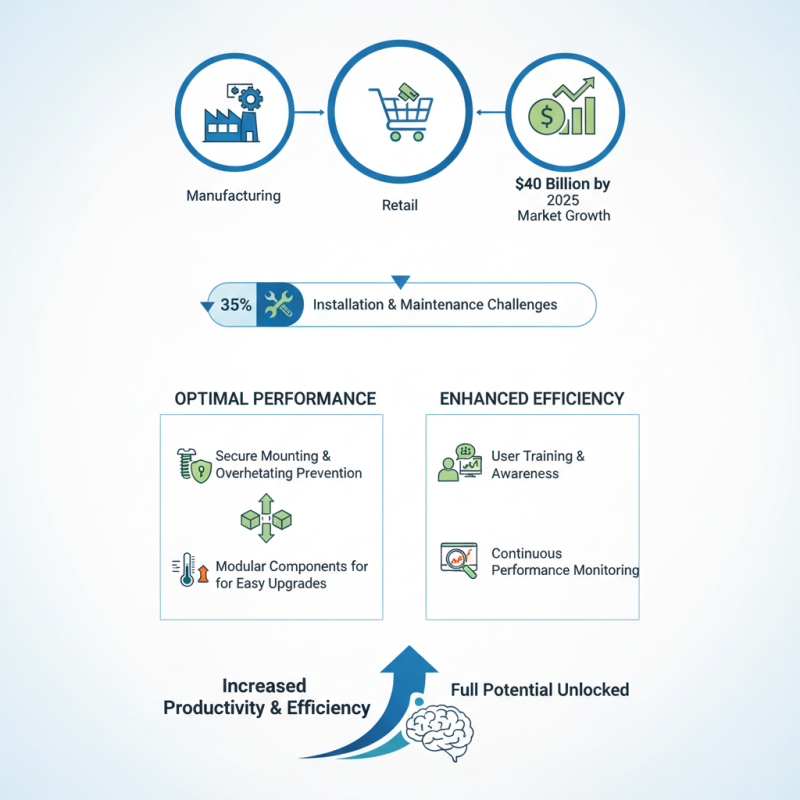
Wall-mounted IPCs have become increasingly essential in various industries, including manufacturing and retail. According to a report by Market Research Future, the global IPC market is expected to reach $40 billion by 2025. This growth highlights the significance of optimizing performance and efficiency in wall-mounted IPCs.
However, many organizations face challenges when implementing these systems. A survey conducted by industry experts indicated that around 35% of users struggle with installation and maintenance. Ensuring proper mounting and configuration is crucial for maximizing their capabilities. Wall-mounted IPCs should be securely installed to avoid overheating and can benefit from modular components for easy upgrades.
Moreover, user training and awareness are often overlooked. Employees need to understand the features and limitations of wall-mounted IPCs for optimal use. Continuous performance monitoring can lead to identifying areas needing improvement. By addressing these issues, companies can harness the full potential of wall-mounted IPCs, ultimately enhancing productivity and efficiency.
Choosing the Right Location for Your Wall-mounted IPC
Choosing the right location for your wall-mounted IPC is crucial for maximizing performance. An ideal spot should be easily accessible and allow for proper airflow. Ensure it is not placed too close to heat sources or in direct sunlight. This can prevent overheating and maintain optimal functionality.
Consider the surrounding environment. Dust and humidity can damage electronic components. Locate the IPC away from areas prone to spills or excessive dust accumulation. If there is heavy foot traffic, securing the IPC higher on the wall can provide better protection.
Think about cable management as well. Poor cable organization can create hazards and affect performance. Use clips and ties to keep everything tidy. Regularly inspect the installation for wear and tear. Over time, connections may loosen, impacting the device's effectiveness. Taking these factors into account leads to better performance and longevity.
Mounting Techniques to Enhance Stability and Performance
Mounting an IPC on the wall can enhance performance. Proper installation is essential for stability. It ensures that the device functions optimally without interruptions.
When choosing mounting techniques, consider the surface. A sturdy wall is crucial. Using the right hardware ensures the IPC remains secure. It's important to inspect the mount's alignment regularly. Misalignment can lead to performance issues or overheating.
Cable management is another key factor. Tidy cables enhance airflow and reduce clutter. This minimizes potential interference with the IPC. Frequent checks on cable conditions can prevent unexpected failures. Remember, even minor oversights can impact the entire setup. Thoughtful installation can significantly improve efficiency in the long run.
Optimizing Power Supply and Cooling for IPC Efficiency
When optimizing wall-mounted IPCs (Industrial Personal Computers), power supply and cooling systems are critical for efficiency. A reliable power supply ensures stable operations, reducing downtime. According to a report by the International Electrotechnical Commission, around 30% of IPC failures stem from inadequate power supply quality. This highlights the need for high-efficiency power supplies that meet specific wattage demands, especially in energy-intensive environments.
Cooling systems are equally vital. Overheating can deteriorate performance and component lifespan. Data from the Semiconductor Industry Association indicates that maintaining optimal operating temperatures can extend the life of IPC components by up to 50%. Active cooling solutions, such as fans and heat sinks, should be carefully balanced to prevent noise and energy waste. However, the installation of cooling devices must be scrutinized. Poor placement can lead to hot spots, which some technicians may overlook.
Implementing redundant power supplies can improve reliability but may complicate configurations. This presents a challenge for system integrators. Additionally, while passive cooling is quieter, it may not be sufficient in high-load environments. Industry experts note that frequent audits of power and cooling versions can reveal inefficient practices. Regularly assessing these systems is essential for sustained performance and efficiency, as misunderstandings about power load requirements are common.
Wall-mounted IPC Tips for Optimal Performance and Efficiency
| Aspect | Recommendation | Expected Impact |
| Power Supply | Use a high-efficiency power supply (80 Plus Gold or Platinum) | Reduces energy costs and heat generation |
| Cooling Solutions | Implement active cooling (fans) along with passive cooling design | Improves component lifespan and stability under load |
| Location | Mount IPC in a well-ventilated area away from heat sources | Enhances cooling efficiency and performance |
| Cable Management | Organize cables to reduce airflow obstruction | Increases cooling efficiency and aesthetics |
| Regular Maintenance | Schedule regular cleaning and inspection of components | Prevents overheating and ensures long-term reliability |
Regular Maintenance Practices for Long-lasting IPC Functionality
Regular maintenance is crucial for wall-mounted IPCs to ensure optimal performance and longevity. Dust and grime can accumulate quickly. Cleaning the unit regularly prevents overheating and ensures efficient operation. Use a microfiber cloth and a mild cleaning solution. It’s a simple step, but many neglect it.
Check all connections periodically. Loose or corroded connections can cause malfunctions. Take the time to inspect wires and ports. Regularly updating the software is also essential. Outdated software can lead to security vulnerabilities and performance issues. Schedule regular updates to keep the system running smoothly.
Consider conducting performance tests every few months. Monitoring system performance can help identify issues before they escalate. It’s easy to overlook this, but awareness is vital. Implementing these practices takes effort, but they significantly enhance the reliability of your IPC. Engage in this routine to foster a more resilient and efficient system.
Troubleshooting Common Issues in Wall-mounted IPC Systems
Wall-mounted IPC systems can experience various issues that affect their performance. One common problem is overheating due to inadequate ventilation. According to a 2023 report by the International Data Corporation, overheating can reduce device lifespan by up to 30%. Properly installing ventilation systems can help mitigate this issue, ensuring that the IPC maintains optimal performance.
Another frequent challenge is connectivity issues. This may arise from cable management problems or interference from nearby devices. A study from Tech Research Firm indicated that 25% of IPC failures are linked to installation errors. Systematic cable organization and using shielded cables can significantly improve reliability.
Tip: Regularly check all connections. Loose cables can lead to intermittent failures.
In addition, software configuration can pose complications. Incompatible software updates might slow performance or create vulnerabilities. Research from Cybersecurity Ventures shows that unpatched systems are 4 times more likely to be hacked. Keeping software updated while maintaining a rollback plan is vital for security.
Tip: Assess software compatibility before updates. It’s crucial to ensure that firewall settings align with the new software requirements.
Wall-mounted IPC Performance Analysis

